The Emirates ID is one of the most important documents for anyone living in the UAE. Whether you are a resident, employee, or business owner, keeping track of your Emirates ID status check is essential.
- What is an Emirates ID?
- Purpose and Importance of Emirates ID in the UAE
- Key Features of Emirates ID You Should Know
- Why Checking Your Emirates ID Status Matters
- How to Check Emirates ID Status Online (Step-by-Step Guide)
- Step 1: Visit the ICP Official Website
- Step 2: Enter Your PRAN, Application Number, or Emirates ID
- Step 3: View and Track Your Emirates ID Status
- Other Ways to Check Emirates ID Status
- Using ICP Mobile App
- Using File Validity Tool
- Emirates ID Status Check by Phone (Helpline)
- In-Person Assistance at Service Centres
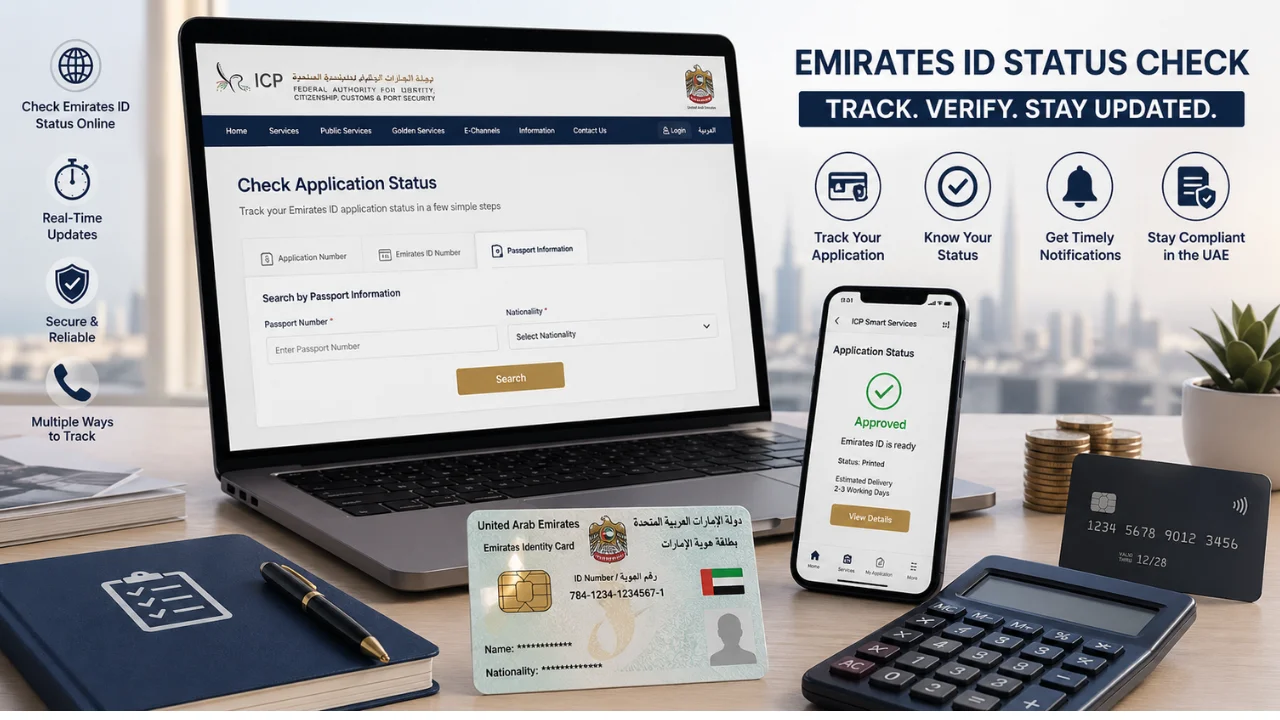
- How to Check Emirates ID Status with Passport Number
- Emirates ID Tracking – Understanding Status Messages
- Where to Find Your PRAN Number
- Emirates ID Application Process
- Step 1: Complete the Application Form
- Step 2: Pay the Required Fees
- Step 3: Biometric Data Submission
- Step 4: Approval and Issuance Process
- Steps for UAE Residency Linked to Emirates ID
- Emirates ID Costs and Fees in the UAE
- How Long Does Emirates ID Processing Take?
- What to Do If Your Emirates ID Status is Delayed
- Using Digital Emirates ID While Waiting
- Emirates ID Online Services – Complete Guide
- Understanding Your Emirates ID Number
- What to Do If You Lose Your Emirates ID
- Is the Emirates ID Card Secure?
- Reasons for Delays in Emirates ID Processing
- Key Tips and Reminders for Emirates ID Tracking
- Conclusion
- FAQs
- How can I check my Emirates ID status online?
- Can I check Emirates ID status using a passport number?
- How long does it take to receive an Emirates ID?
- What should I do if my Emirates ID status is pending or delayed?
- What does “Approved” status mean?
- Can I track Emirates ID delivery?
- What if I lose my PRAN number?
- Can I use digital Emirates ID before receiving the card?
- Will I receive SMS updates for my application?
- Is a medical fitness test required for Emirates ID?
- Do I need to renew my Emirates ID after expiry?
Dubai Archives‘ guide explains everything in simple terms, including how to check your Emirates ID status online, how to track your application, and what to do in different situations.
What is an Emirates ID?
The Emirates ID is a mandatory identity card issued to all UAE citizens and residents. It is managed by the Federal Authority for Identity, Citizenship, Customs and Port Security (ICP).
This card contains your personal details, biometric data, and a unique identification number. It acts as your official identity proof across the UAE.
You will need your Emirates ID for daily tasks such as opening a bank account, accessing government services, renting a home, and even for mobile SIM registration.
Purpose and Importance of Emirates ID in the UAE
The Emirates ID plays a key role in daily life in the UAE. It is not just an ID card, but a central system that connects various services.
Here are the main purposes:
- Identity verification for residents and citizens
- Access to healthcare and insurance services
- Opening bank accounts and financial transactions
- Government services and smart portals
- Travel within GCC countries (in some cases)
Without a valid Emirates ID, many essential services may not be accessible.
Key Features of Emirates ID You Should Know
The Emirates ID includes advanced features to ensure security and ease of use.
Important features include:
- Smart chip storing biometric data
- Unique ID number for each individual
- Digital integration with UAE Pass
- High security design to prevent fraud
- Link with residency visa
These features make the Emirates ID a secure and reliable identification system in the UAE.
Why Checking Your Emirates ID Status Matters
Tracking your Emirates ID application helps you stay informed about progress and avoid delays.
Many residents forget to check their Emirates ID status, which can lead to missed updates or delays in receiving the card.
Practical Reasons for Tracking Your ID
There are several everyday reasons to perform an emirates id tracking:
- To know if your ID is ready for collection
- To avoid delays in job processes
- To ensure visa-related tasks are completed
- To plan travel or official work
Benefits of Emirates ID Status Check
Regular emirates id check provides many advantages:
- Saves time by avoiding unnecessary visits
- Keeps you updated with real-time progress
- Helps you take quick action if issues arise
- Ensures smooth access to services
How to Check Emirates ID Status Online (Step-by-Step Guide)
The easiest way to check your Emirates ID status is online. The process is simple and takes only a few minutes.
You can use the official ICP portal for emirates id status check online.
Step 1: Visit the ICP Official Website
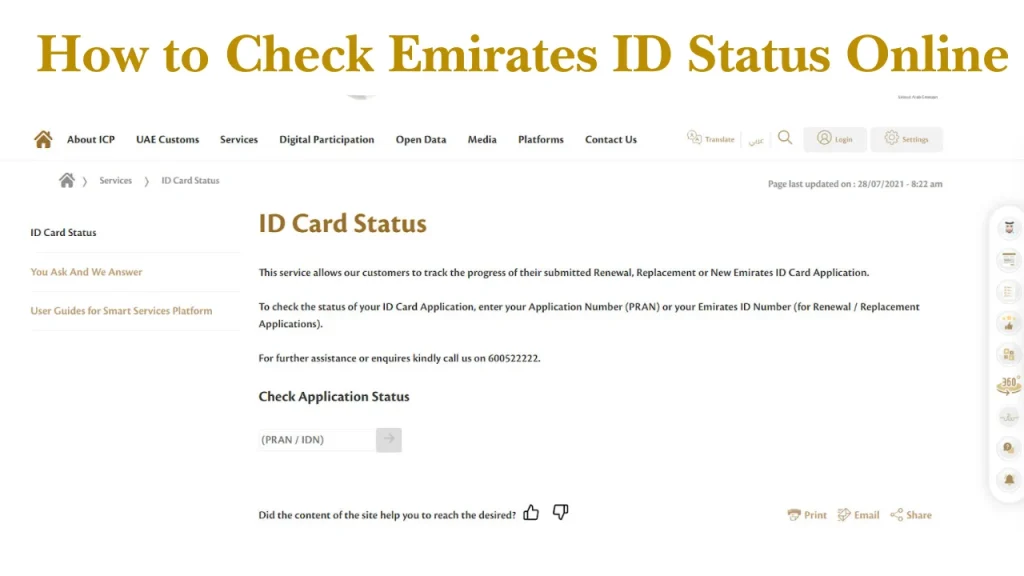
Go to the official ICP website:
https://icp.gov.ae
On the homepage, find the “Check Application Status” option.
Step 2: Enter Your PRAN, Application Number, or Emirates ID
You can enter any of the following:
- PRAN (Pre-Registration Application Number)
- Emirates ID number
- Application number
Make sure the number is correct before proceeding.
Step 3: View and Track Your Emirates ID Status
After entering details:
- Click on the “Check Status” button
- Your emirates id application status will appear
- You can see current progress and updates
This is the simplest way to track emirates id online.
Other Ways to Check Emirates ID Status
One of the easiest methods to check your Emirates ID at any time and from any location is to use the ICP mobile application. It is helpful for safe access via UAE Pass and fast updates.
Using ICP Mobile App
The ICP mobile app allows easy tracking.
Steps:
- Get the ICP UAE Smart app from the Apple App Store or Google Play Store.
- Launch the app and enter your UAE Pass login information.
- Go to the “ID Services” or “Application Status” section.
- Enter your PRAN or Emirates ID number.
- To see the status of your Emirates ID application, tap “Search.”
Helpful Tips:
- Make sure your UAE Pass is active and verified
- Keep your login details secure
- Enable notifications to receive updates instantly
Using File Validity Tool
Another helpful alternative is the File Validity Tool, particularly if you wish to verify the tracking information for both your visa and Emirates ID at the same time.
You can access it directly through the official ICP portal:
https://smartservices.icp.gov.ae
Steps:
- Go to the website of ICP Smart Services.
- Select “File Validity” from the public services menu.
- Choose a search type, such as “Passport Information.”
- Enter your nationality and passport number.
- To access your details, click “Search.”
Emirates ID Status Check by Phone (Helpline)
You can call ICP helpline for assistance.
- Call the ICP customer support number (600 522222)
- Select the appropriate language option
- Provide your PRAN or Emirates ID number
- Follow the instructions or speak to a support agent
Benefits of this method:
- Get real-time assistance
- Ask questions about delays or errors
- Suitable for users who are not comfortable with online systems
In-Person Assistance at Service Centres
An ICP service center is a dependable choice if you require in-depth assistance or encounter technical difficulties. This is particularly helpful in complicated situations like inaccurate data or delayed applications.
How to check the status of an Emirates ID in person:
- Go to the ICP Customer Happiness Center that is closest to you.
- Bring the required paperwork, such as a copy of your passport, application receipt, or Emirates ID.
- Obtain a queue token and bide your time.
- Ask for help to verify the status of your Emirates ID.
- You will receive guidance and updates from the team.
How to Check Emirates ID Status with Passport Number
If you do not have your PRAN or Emirates ID number, you can still complete an emirates id status check using your passport details. This method is very helpful for new applicants or those who have misplaced their application receipt.
Step-by-Step Guide to Check Emirates ID Status with Passport Number
Follow these simple steps to check emirates id status using your passport:
- Visit the official ICP Smart Services portal:
https://smartservices.icp.gov.ae - Look for the “File Validity” or status check option
- Select the search method as “Passport Information”
- Enter the following details carefully:
- Passport Number
- Nationality
- Date of Birth, if required
- Click on the Search button
- Your emirates id application status will appear on the screen
This method helps if you do not have your PRAN.
Emirates ID Tracking – Understanding Status Messages
When you perform an emirates id status check, you may see different messages.
Understanding these messages helps you know what to do next.
Common Status Updates and Their Meaning
- Application Received: Your request is submitted
- Under Process: Verification is ongoing
- Approved: Your ID is ready
- Printed: Card is produced
- Dispatched: Sent for delivery
Common Errors and How to Fix Them
Some common issues include:
- Incorrect number entered
- Delay in processing
- Missing documents
Solutions:
- Recheck details
- Contact support
- Visit service centre
Where to Find Your PRAN Number
PRAN is required for tracking.
You can find it:
- On application receipt
- In SMS confirmation
- From typing centre
Keep this number safe for future use.
Emirates ID Application Process
Applying for Emirates ID involves several steps.
Step 1: Complete the Application Form
Fill the form online or at a typing centre.
Step 2: Pay the Required Fees
Fees depend on validity and service type.
Step 3: Biometric Data Submission
You will need to:
- Provide fingerprints
- Take photo
- Submit documents
Step 4: Approval and Issuance Process
After submission:
- Application is reviewed
- Card is printed
- Delivered to you
Steps for UAE Residency Linked to Emirates ID
Your UAE residency visa and your Emirates ID are handled jointly because they are intimately linked. This is how the procedure operates:
- First, use your employer, sponsor, or other appropriate authority to apply for a UAE resident visa. This initiates the legal stay procedure in the United Arab Emirates.
- To make sure you match the health criteria specified by UAE authorities, you must go through a medical fitness test (typically a blood test and X-ray).
- You apply for your Emirates ID following the medical examination. This entails sending in your personal information as well as biometric information such as a picture and fingerprints.
- Your residency visa is stamped (or digitally issued) and connected to your Emirates ID after everything has been authorized. You then formally become a resident of the United Arab Emirates.
Emirates ID Costs and Fees in the UAE
Costs vary based on validity:
| Validity | Cost (Approx.) |
| 1 year | AED 170–270 |
| 2 years | AED 270–370 |
| 3 years | AED 370+ |
Additional service charges may apply.
How Long Does Emirates ID Processing Take?
Processing time usually takes:
- 5 to 10 working days
- May vary depending on application
Delivery and Collection Details
Once ready:
- Card is sent via Emirates Post
- You receive SMS notification
- Collect from post office
What to Do If Your Emirates ID Status is Delayed
Delays can happen due to various reasons.
Who Can Track Emirates ID on Your Behalf
- Employers
- Typing centres
- PRO services
Useful Tips for Faster Status Updates
- Ensure correct documents
- Complete biometrics on time
- Check status regularly
Using Digital Emirates ID While Waiting
You can use a digital ID before receiving a physical card.
Travel Scenarios During Processing
In some cases:
- Digital ID can be used
- Check airline requirements
Integration with UAE Pass
UAE Pass allows:
- Digital ID access
- Online verification
- Secure login
Emirates ID Online Services – Complete Guide
| Service | What It Means | Steps to Follow | Important Notes |
| Download Emirates ID Online | You can access a digital copy of your Emirates ID anytime without needing the physical card. | 1. Log in to the ICP app2. Open Digital ID section3. Download PDF version | Useful for travel, verification, and online services. Always keep a copy saved on your phone. |
| Change Emirates ID Mobile Number | Update your registered mobile number to receive OTPs and important updates. | 1. Visit ICP website2. Choose update mobile number option3. Enter new number4. Verify with OTP | Required for accessing many UAE services. Also helpful for Etisalat and SIM-related updates. |
| Renew Emirates ID | You must renew your ID before it expires to avoid fines or service interruptions. | 1. Apply online through ICP2. Pay renewal fees3. Update biometrics if required | Late renewal may result in penalties. Renewal is usually linked with visa renewal. |
| Cancel Emirates ID | Required when your residency visa is cancelled or you leave the UAE permanently. | 1. Apply via employer/sponsor or ICP2. Submit cancellation request | Cannot keep Emirates ID without a valid visa. Always cancel before exiting permanently. |
| Emirates ID Linked to Residency Visa | Your Emirates ID and residency visa are directly connected in the UAE system. | No separate steps – processed together with visa | Without a valid Emirates ID:• Visa services may stop• Government services may be restricted |
Understanding Your Emirates ID Number
The number includes:
- Country code
- Year of birth
- Unique digits
It remains the same for life.
What to Do If You Lose Your Emirates ID
If lost emirates id:
- Report immediately
- Apply for replacement
- Pay replacement fee
Is the Emirates ID Card Secure?
Yes, it is highly secure.
Security features include:
- Biometric data
- Smart chip
- Encrypted system
Reasons for Delays in Emirates ID Processing
Common reasons:
- Missing documents
- Biometric delays
- System issues
Key Tips and Reminders for Emirates ID Tracking
- Always keep PRAN safe
- Check status regularly
- Use official platforms only
- Update mobile number
Also, staying updated with services like Lulu balance check, Fab bank balance check in Dubai, Ratibi card balance check, and dubai archives update can help you manage your daily UAE services smoothly.
Conclusion
Checking your Emirates ID status is simple and important. With online tools, mobile apps, and service centres, you can easily stay updated.
Always keep your documents ready and track your application regularly to avoid delays.
FAQs
How can I check my Emirates ID status online?
Visit the ICP website, enter your PRAN or ID number, and view status instantly.
Can I check Emirates ID status using a passport number?
Yes, you can use passport details on ICP portal.
How long does it take to receive an Emirates ID?
Usually 5 to 10 working days.
What should I do if my Emirates ID status is pending or delayed?
Check documents, contact ICP, or visit service centre.
What does “Approved” status mean?
It means your ID is ready for printing or delivery.
Can I track Emirates ID delivery?
Yes, via Emirates Post tracking system.
What if I lose my PRAN number?
Check SMS or contact typing centre.
Can I use digital Emirates ID before receiving the card?
Yes, through UAE Pass.
Will I receive SMS updates for my application?
Yes, updates are sent to your registered number.
Is a medical fitness test required for Emirates ID?
Yes, for residency visa applicants.
Do I need to renew my Emirates ID after expiry?
Yes, renewal is mandatory to avoid fines.